
In this article, you will learn how to activate the VoIP phone system in JobyDesk.
The VoIP phone system acts as a centralized workspace for all your business communications, bringing together inbound and outbound calls, SMS, and AI-powered transcriptions. Enabling this feature unlocks the full suite of communication controls needed to manage local lines and customer interactions in one place.
Enabling the VoIP Add-on
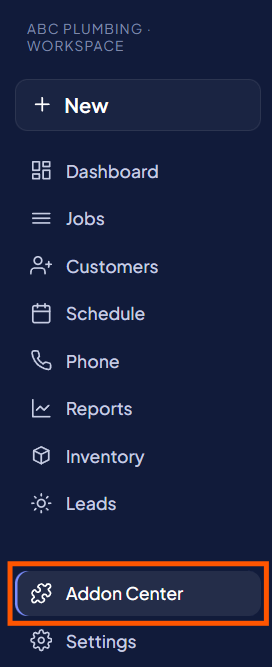
In order to start using the VoIP phone system, you will need to access your Add-on Center.
1. Access the Add-on Center:
Navigate to the Add-on Center from your main menu.
2. Find Customer Experience:
Locate the Customer Experience category within the center.
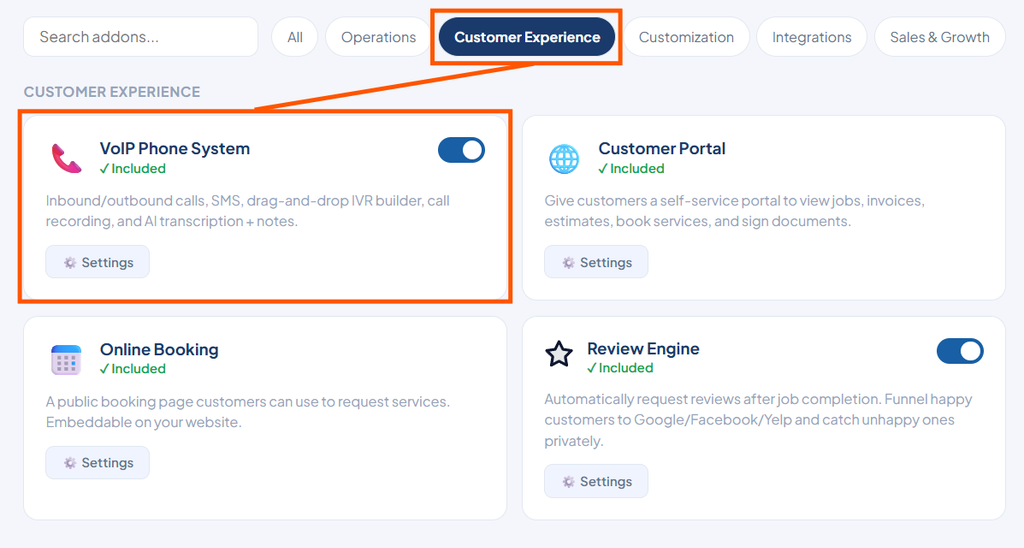
3. Turn On VoIP:
Switch the toggle to On for the VoIP Phone System add-on.
4. Open Settings:
Click into Settings to begin setting up your phone system.
After activating the add-on, you can proceed to set up your phone lines and assign them to your team.